Plug SoundHound AI into your world with model context protocol (MCP)
MCP support within OASYS makes connecting AI agents to your systems easier and faster than ever

SUBSCRIBE
Quick Answers:
Q: What is Model Context Protocol (MCP)?
A: MCP is an open standard that lets AI agents reliably find, understand, and use systems and APIs to complete tasks.
Q: How does MCP enhance the OASYS platform?
A: MCP enables a standard, reusable way to connect OASYS AI agents to enterprise tools, so teams don't need to rebuild integrations for every new use case or channel.
Q: Why does MCP matter for enterprises?
A: MCP gives enterprises a safer, faster, and scalable way to plug AI agents into live systems. This limits one-off integrations, simplifies governance, and keeps AI experiences consistent, even as systems evolve.
OASYS now supports MCP (Model Context Protocol), a standard way to connect AI agents to your APIs, databases, and enterprise tools.
It’s never been simpler for OASYS to communicate with your CRMs, ERPs, apps, and more. Define a connection once, and reuse it across every AI agent and channel. No more one-off integrations or custom glue code. This helps for faster setup, less maintenance, safer access to your live enterprise data, and AI agents that can smoothly complete tasks end-to-end.
For many enterprises, the question is no longer whether AI can answer your customers — it’s whether it can safely take action for them. The key to this is simple, seamless system integration for AI agents.
The traditional challenge is that CRMs, ERPs, ticketing tools, and internal APIs all have their own rules and interfaces, and every new AI use case risks becoming another custom integration project.
OASYS addresses this by supporting the Model Context Protocol (MCP), a standard way to connect AI agents to your tools, reducing one-off wiring and bringing consistency to how AI experiences use live enterprise data. Simpler and safer than ever, you can now let AI agents complete tasks end-to-end in your existing systems, with less glue code and more governance.
What is Model Context Protocol (MCP)?
MCP integrations introduce a universal communication channel between OASYS AI agents and MCP servers that connect your tools and data sources. MCP universally defines how AI systems can discover tools, understand what those tools do, and call them in a structured, predictable way. It has quickly become a standard AI agent deployment best practice.
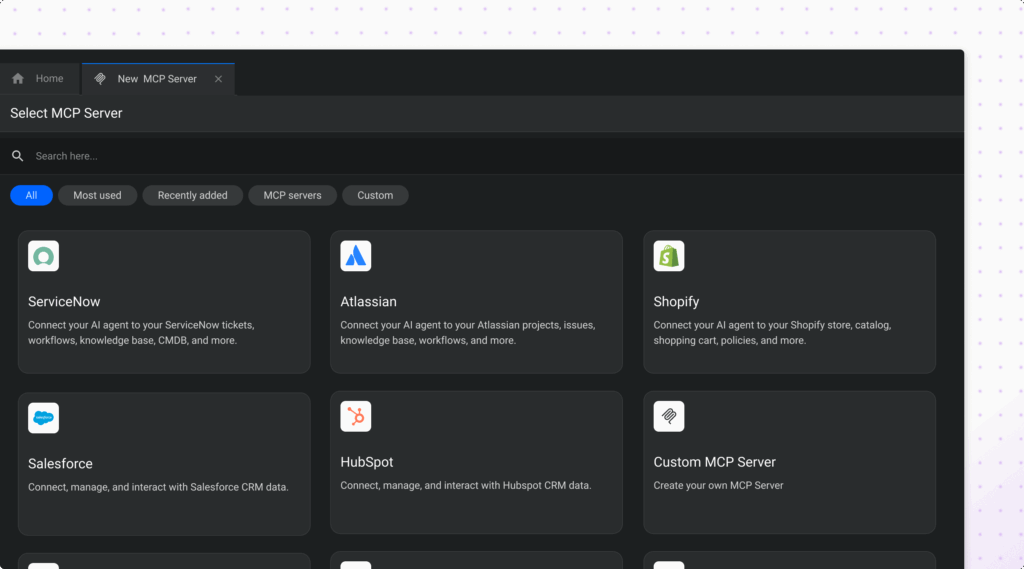
For architects and integration teams, this means having a standard pattern to connect OASYS to enterprise tools and APIs — including CRM and ERP systems, ticketing platforms, and internal microservices — without reinventing the wiring for each new domain or channel.
MCP support is built into our core UI, so MCP-based tools are treated as first-class elements in our orchestration stack, right alongside existing integration approaches.
Why MCP matters for enterprise integrations
Many organizations already have multiple AI-powered experiences live or in pilot. The hard part is keeping those experiences connected, consistent, and compliant as back-end systems evolve.
Without a standard like MCP, teams often struggle with:
- Custom integrations per use case or channel
- Slightly different behaviors in each bot or AI agent
- Extra work every time an API, schema, or security policy changes
By standardizing how AI connects to tools, MCP reduces duplication and tightens controls. This helps:
- Make connections a shared asset to be recycled, not a one-off project
- Apply consistent authentication and authorization patterns across agents
- Improve visibility into how AI is using back-end capabilities
The result is more scalable enterprise integrations: you “define once, reuse everywhere” instead of rebuilding the same actions again and again.
Use cases for MCP-powered AI agents
MCP is most valuable where many systems and channels share similar actions. Here are some common, powerful use cases to spark your imagination.
Shared CRM actions across AI agents
CX and CRM teams can expose standard CRM capabilities — such as creating or updating cases, modifying contact details, or logging interactions — via a single MCP integration. Multiple AI agents across voice, web, and messaging can all access that shared MCP toolset. This really means personalization at scale.
ERP-driven order management
Operations and contact center leaders can use MCP to connect to an ERP system. AI agents can then check order status, update shipping information, or trigger returns using MCP tools defined once at the integration layer.
Instead of custom per-flow wiring, the ERP tools become reusable building blocks that agents can orchestrate as part of multi-step order management journeys.
IT and HR tools hub
Internal IT and HR teams can expose password reset flows, ticket creation, policy lookups, and other internal actions via MCP. AI agents that support employees — through chat, portals, or other internal channels — can tap into these standardized MCP integrations to take action, like answering complicated personal setup questions, or even resolving a ticket directly.
Integrate with MCP-compatible external AIs
Some enterprises began deploying AI agent platforms using self-build tools from Big Tech companies and relied on internal engineering resources to build from scratch. Without extensive conversational AI and agentic experience, results have often been inconsistent.
MCP provides an avenue for these enterprises to connect what they’ve built to a proven conversational AI platform such as OASYS without a complete architectural rebuild. This gives enterprises access to a platform that combines years of domain-specific development with pre-integrated components such as low-latency voice, natural language understanding, orchestration, analytics, and increasingly, agentic AI capabilities.
Monitoring and troubleshooting for MCP-powered agents
When something breaks or behaves unexpectedly, admins can turn to enhanced MCP event logs in the Admin UI.
From there, they can review recent tool calls and results, identify misconfigurations or upstream system issues, and iterate on MCP definitions and templates without redeploying entire experiences. This improves operational confidence and shortens the time from issue detection to resolution.
MCP strengthens data security
MCP in OASYS is designed so teams can connect their powerful tools to AI agents without opening up more risk. With MCP integrations, you can:
- Control what AI can access. Define exactly which tools and data each MCP server exposes, so agents only see the actions they should be able to perform.
- Centralize authentication. Use keys and tokens managed in the Admin UI, rather than credentials hidden in individual flows or services.
- Align with existing security policies. Integration and security teams can configure MCP to match current identity and access management patterns.
- Increase visibility and auditability. Enhanced MCP event logs show which tools were called, when, and with what inputs and results.
This enables a more governed approach to connecting AI to live systems: you can plug OASYS into your world while keeping tight control over how sensitive data and actions are exposed.
How MCP works in OASYS
MCP in OASYS is designed so teams can connect, manage, and monitor tools quickly — without diving into heavy configuration details.
MCP integrations as first-class tools
MCP integrations are seamlessly embedded within the Admin UI, designed to make it effortless for users to create, edit, and delete integrations to suit their business needs. OASYS automatically syncs the functions those servers expose, allowing AI agents to discover and call them with ease.
By leveraging MCP-based tool calling, agents can perform tasks such as updating a CRM case or checking an ERP order status using standardized tools instead of relying on custom endpoints.
Templates and configuration for faster setup
MCP integration templates within OASYS streamline setup, providing faster deployment without sacrificing security. These pre-defined templates allow users to start with recommended configurations, eliminating the need to build every integration from scratch. Template-driven forms also come pre-filled in key fields, while still giving admin users the control to adjust details as needed.
Even with the faster setup, security remains a top priority. Authentication uses keys and tokens so integration and security teams can control secure access to underlying tools and data.
Logging, monitoring, and APIs for operational control
Enhanced MCP logs in the Admin UI, with improved readability and pagination, make it easier to track what happened and when. A richer view of these logs allows admins to quickly inspect tool calls, identify issues, and better understand agent behavior.
In addition, MCP integrations APIs provide teams with the ability to script the creation, updates, exports, and imports of configurations, ensuring MCP integrations remain aligned with CI/CD workflows and environment management.
The bigger picture: MCP and OASYS
MCP support is more than another connector — it reinforces OASYS' role as an agentic AI platform for complex, real-world workflows.
By standardizing how tools are defined and called, MCP makes it easier for our AI agents to orchestrate multi-step tasks that span several back-end systems, reuse the same capabilities across domains and channels, and evolve alongside your systems without massive rework.
Rather than forcing rip-and-replace, OASYS works with the CRMs, ERPs, ticketing platforms, and internal services you already rely on.


Experience SoundHound
Learn how OASYS AI agents handle your conversations in the real world.
Experience AI agents built around your actual use cases
See how we balance flexibility and reliability
Explore how we deliver outcomes that matter to you
Discuss what support looks like